Hi everybody, how's it going on this cold, grey and snowy Tuesday?
Did you ever play the Sims 2 when you were younger?
Back in the day, I lost a great deal of life sitting in front of the old laptop,
decorating houses and playing the puppet master of my Sims' life.
Well, at one point they released yet another expansion pack with teen stuff,
and I immediately got a flash back to that, when I saw these pictures on IKEA's Livet Hemma blog.
You see, in the expansion pack with teen stuff, they had at the back of the box, a picture on how you could decorate the rooms.
I remember they had done it exactly like this; one room with the same furniture,
but separated by different colours and room painting.
I normally wouldn't have posted this, but I just got such a huge Sims flashback that I simply had to do it!
You all have a wonderful day now
- I'm going down to the basement to find my old HP laptop and all of the old Sims 2 games.
Cheers!
Showing posts with label Computer Stuff. Show all posts
Tuesday, January 28, 2014
Tuesday, January 14, 2014
In this case, I love the case
Hello and happy Tuesday to you all!
Tuesday is a lovely day - mainly cause it's my day off.
Today, however, I have even more reason to smile. I just god a parcel in the mail,
and in it was my two new cases for my iPhone and iPad mini.
I actually ordered them a couple of weeks back, but since they were shipped from Thailand, it took a little while.
However, they are totally worth the wait! It's no secret that I do love black and white stripes - they're everywhere in apartment 107. And since it was time for new cases anyway, I thought I'd match them up with my home interior. And oh how lovely they look!
Well, that's all from me today.
Have the happiest of days - and remember to smile and be happy ♡
Tuesday is a lovely day - mainly cause it's my day off.
Today, however, I have even more reason to smile. I just god a parcel in the mail,
and in it was my two new cases for my iPhone and iPad mini.
I actually ordered them a couple of weeks back, but since they were shipped from Thailand, it took a little while.
However, they are totally worth the wait! It's no secret that I do love black and white stripes - they're everywhere in apartment 107. And since it was time for new cases anyway, I thought I'd match them up with my home interior. And oh how lovely they look!
Well, that's all from me today.
Have the happiest of days - and remember to smile and be happy ♡
If you're interested in getting a new case too, I suggest to stop by rabbitsmile's Etsy page - that's where I've ordered all of my cases.
Etiketter:
At Home,
Black and White,
Computer Stuff,
Minimalism,
New In,
New Purchase
Sunday, January 12, 2014
Apartment 107 - My workspace
Hallih Halluh on a chilly January evening.
Tomorrow I have school all day, and since my night classes end at 10 PM,
I figure I won't have the time to post. So instead, I thought I'd post some pictures from my own home tonight.
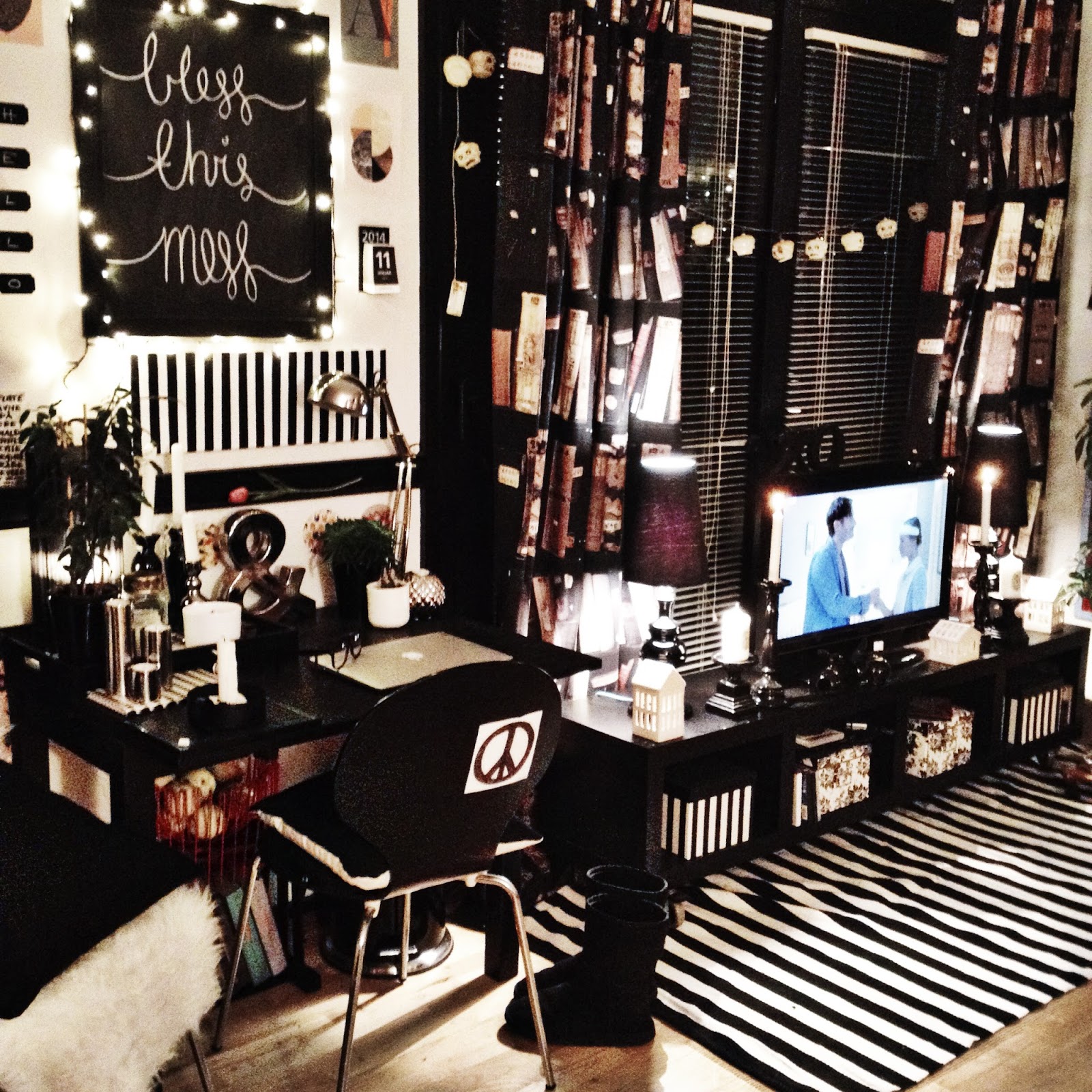
It's hard to find places for every important home section in a one-bedroom apartment, but I think I make it work.
My workspace is a good example of that:
For a long time, I used this table as a dining table - which it is - but a few months back,
I decided I needed a workspace more. I eat in front of the telly anyway - ah, single life, haha.
Anyways, It's the perfect little spot for concentrating on homework or blog posts, plus it fits perfectly in that little nook.
I hope all of you are having fun gearing up for a new week.
Stay warm and keep on smiling ♡
Tomorrow I have school all day, and since my night classes end at 10 PM,
I figure I won't have the time to post. So instead, I thought I'd post some pictures from my own home tonight.
It's hard to find places for every important home section in a one-bedroom apartment, but I think I make it work.
My workspace is a good example of that:
For a long time, I used this table as a dining table - which it is - but a few months back,
I decided I needed a workspace more. I eat in front of the telly anyway - ah, single life, haha.
Anyways, It's the perfect little spot for concentrating on homework or blog posts, plus it fits perfectly in that little nook.
I hope all of you are having fun gearing up for a new week.
Stay warm and keep on smiling ♡
Sunday, November 17, 2013
Screensavers for Mac and Windows
A couple of weeks back I got my very first MacBook - a spankin' new MacBook Air, to be precise.
It's the best gift I've ever gotten; I've always had Windows computers, and while they are slightly easier to work from the get-go - compared to a Mac, in my opinion - they do tend to run out of gas fairly quickly.
Funny thing is, a year ago I was the ultimate Apple hater, and today I own an iPhone, an iPad Mini and now my beloved MacBook Air. Quite a change for one year.
Anyway, I'm in love with my Mac; once I got into all of the different ways of doing things - thanks to my own personal Apple guru and best friend, Kasper (find his blog here) - I can't imagine how I could live with "just a Windows computer" before. Don't get me wrong; I ain't mocking Windows, but I'm just so wrapped up in my Mac right now - haha.
Well, I'm quite babbly today, but the thing I wanted to post about was this:
A MacBook in itself is a piece of art, but I've found that different "goodies" can make a huge difference to just a black screen. A screensaver can go a long way, and it can actually compliment the interior in your office, living room or where ever you keep your computer.
I'm not so fond of the original screensavers that came with the Mac, so I quickly became obsessed with finding screensavers myself.
Of course I turned to Fliqlo right away; it's simple, minimalistic, beautiful and practical. However, after the new Mavericks update a few weeks ago, Fliqlo hasn't been updated for the new OS X system and therefore does not work with Mavericks.
In stead, I've found a couple of alternatives for beautiful screensavers - and don't worry; if you don't have a Mac, but instead are using a Windows computer, don't close this post down just yet! Because I'm glad to tell you that many screensavers today actually work on both Mac and Windows operating systems.
Here's a few of the once I've downloaded - for free and entirely legal - over the last couple of weeks:
Fliqlo
Flawless and beautiful, Fliqlo can be downloaded here and works for both Mac and Windows.
Note: After the new Mavericks for Mac, Fliqlo has yet to be updated. Still works with older OS X operating systems though.
FlipClock
A nice alternative while we're waiting for Fliqlo to update, is the FlipClock Europe 0.5 screensaver.
It works fine with Mavericks, and you can get both an American version (AM and PM) or an European version (24 hours). You can get the FlipClock screensaver(s) by following this link.
Side Note: This is currently the screensaver I'm using the most.
3D FlipClock Screensaver
Yet another flip clock screensaver, although this one is just for the people using Windows - I thought I'd be a good girl and throw this one in too. Get it here.
Build Clock Screensaver
A nice alternative with an artistic edge. A bit distracting yes, but still very pretty - why not give it a chance? Get it here and prepare to be mesmerized. Works with Mavericks update.
Note: Needs an email signup for their newsletter, but don't worry; they don't fill your inbox with mails.
Word Clock
Word Clock is a very simple and nice looking screensaver, which works as a clock, only instead of numbers it has the time in words. It's something new, and yet I can't figure out why it hasn't been done before. Works for both Mac (with Mavericks) and Windows, and you can get it for free here.
The Almanac Zoo
Clusta's "Almanac Zoo" is the last screensaver I have for you today. It's cute and funny and still very stylish and pleasant to look at. Minimalistic - yes - and also adorable. You can get the screensaver for free here, and it works for both Mac (Mavericks) and Windows.
_______________________________________________________________________________________________________
It's the best gift I've ever gotten; I've always had Windows computers, and while they are slightly easier to work from the get-go - compared to a Mac, in my opinion - they do tend to run out of gas fairly quickly.
Funny thing is, a year ago I was the ultimate Apple hater, and today I own an iPhone, an iPad Mini and now my beloved MacBook Air. Quite a change for one year.
Anyway, I'm in love with my Mac; once I got into all of the different ways of doing things - thanks to my own personal Apple guru and best friend, Kasper (find his blog here) - I can't imagine how I could live with "just a Windows computer" before. Don't get me wrong; I ain't mocking Windows, but I'm just so wrapped up in my Mac right now - haha.
Well, I'm quite babbly today, but the thing I wanted to post about was this:
A MacBook in itself is a piece of art, but I've found that different "goodies" can make a huge difference to just a black screen. A screensaver can go a long way, and it can actually compliment the interior in your office, living room or where ever you keep your computer.
I'm not so fond of the original screensavers that came with the Mac, so I quickly became obsessed with finding screensavers myself.
Of course I turned to Fliqlo right away; it's simple, minimalistic, beautiful and practical. However, after the new Mavericks update a few weeks ago, Fliqlo hasn't been updated for the new OS X system and therefore does not work with Mavericks.
In stead, I've found a couple of alternatives for beautiful screensavers - and don't worry; if you don't have a Mac, but instead are using a Windows computer, don't close this post down just yet! Because I'm glad to tell you that many screensavers today actually work on both Mac and Windows operating systems.
Here's a few of the once I've downloaded - for free and entirely legal - over the last couple of weeks:
Fliqlo
Flawless and beautiful, Fliqlo can be downloaded here and works for both Mac and Windows.
Note: After the new Mavericks for Mac, Fliqlo has yet to be updated. Still works with older OS X operating systems though.
FlipClock
A nice alternative while we're waiting for Fliqlo to update, is the FlipClock Europe 0.5 screensaver.
It works fine with Mavericks, and you can get both an American version (AM and PM) or an European version (24 hours). You can get the FlipClock screensaver(s) by following this link.
Side Note: This is currently the screensaver I'm using the most.
3D FlipClock Screensaver
Yet another flip clock screensaver, although this one is just for the people using Windows - I thought I'd be a good girl and throw this one in too. Get it here.
Build Clock Screensaver
A nice alternative with an artistic edge. A bit distracting yes, but still very pretty - why not give it a chance? Get it here and prepare to be mesmerized. Works with Mavericks update.
Note: Needs an email signup for their newsletter, but don't worry; they don't fill your inbox with mails.
Word Clock
Word Clock is a very simple and nice looking screensaver, which works as a clock, only instead of numbers it has the time in words. It's something new, and yet I can't figure out why it hasn't been done before. Works for both Mac (with Mavericks) and Windows, and you can get it for free here.
The Almanac Zoo
Clusta's "Almanac Zoo" is the last screensaver I have for you today. It's cute and funny and still very stylish and pleasant to look at. Minimalistic - yes - and also adorable. You can get the screensaver for free here, and it works for both Mac (Mavericks) and Windows.
_______________________________________________________________________________________________________
Have a happy time pimpin' your computer! ♡
Etiketter:
At Home,
Black and White,
Computer Stuff,
Life Lately.,
Minimalism,
Office Space,
Other
Subscribe to:
Posts (Atom)